



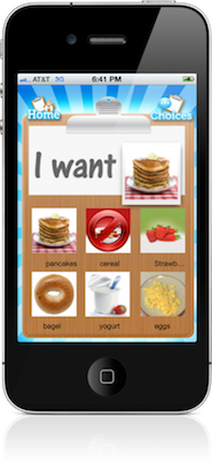
The primary purpose of MY CHOICE BOARD is to present a simple audio-visual display of “choices” to those with limited communication skills. This gives individuals with Autism, communication delays or learning differences an opportunity to be independent and express their own specific needs and wants. MY CHOICE BOARD IS easy to use and perfect for creating “quick” choice boards "on the go". |
 
“My Daniel uses choice boards all day at school and at home. It requires us to take a picture, laminate, then apply velcro to any new toy or game he likes. This app you can do the same thing without creating binder after binder of PECS and pictures. If you’ve ever had to go through that process you know how tedious it is. If not, consider yourself lucky! At least now I know “An App can do that too!”
~www.asparenting.com |




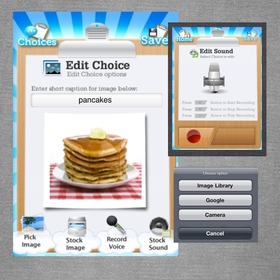
Add Custom Images: Add to custom images to the choice board by using the iPhone’s built in camera, the internet search feature or download images from your personal computer and save onto the “camera roll” album for future use in other schedules. Add to custom images to a choice board by using: |
|
- iPhone/ iTouch built in camera
- Download images from your personal computer and save onto the “camera roll” album for future use.
- Use the built in internet image search feature to find images.
Record audio to images to help promote receptive and expressive language acquistion.

|


A choice can be shown as "not available" by placing a circle/slash over the top of the image. This helps to give a visual cue to let the user know that that choice is currently not an option. |

